Pre & Post Behaviour Checklist

Step by Step
From QR Scan to Compliance Report in Minutes
Vision Trak's digital checklist system turns a paper-based headache into a streamlined, audit-ready process your entire fleet can follow from day one.
Add Drivers & Assign Vehicles
Add each driver in VTtools with their licence details. Every driver gets a unique 4-digit PIN. Assign a vehicle type to each asset so the right checklist is served automatically.
Print & Place the Vehicle QR Code
Each vehicle gets a unique QR code from the asset management page. Download as PNG or PDF, print it, and attach to the driver's clipboard or cab. No app needed.
Scan, Enter PIN, Verify Identity
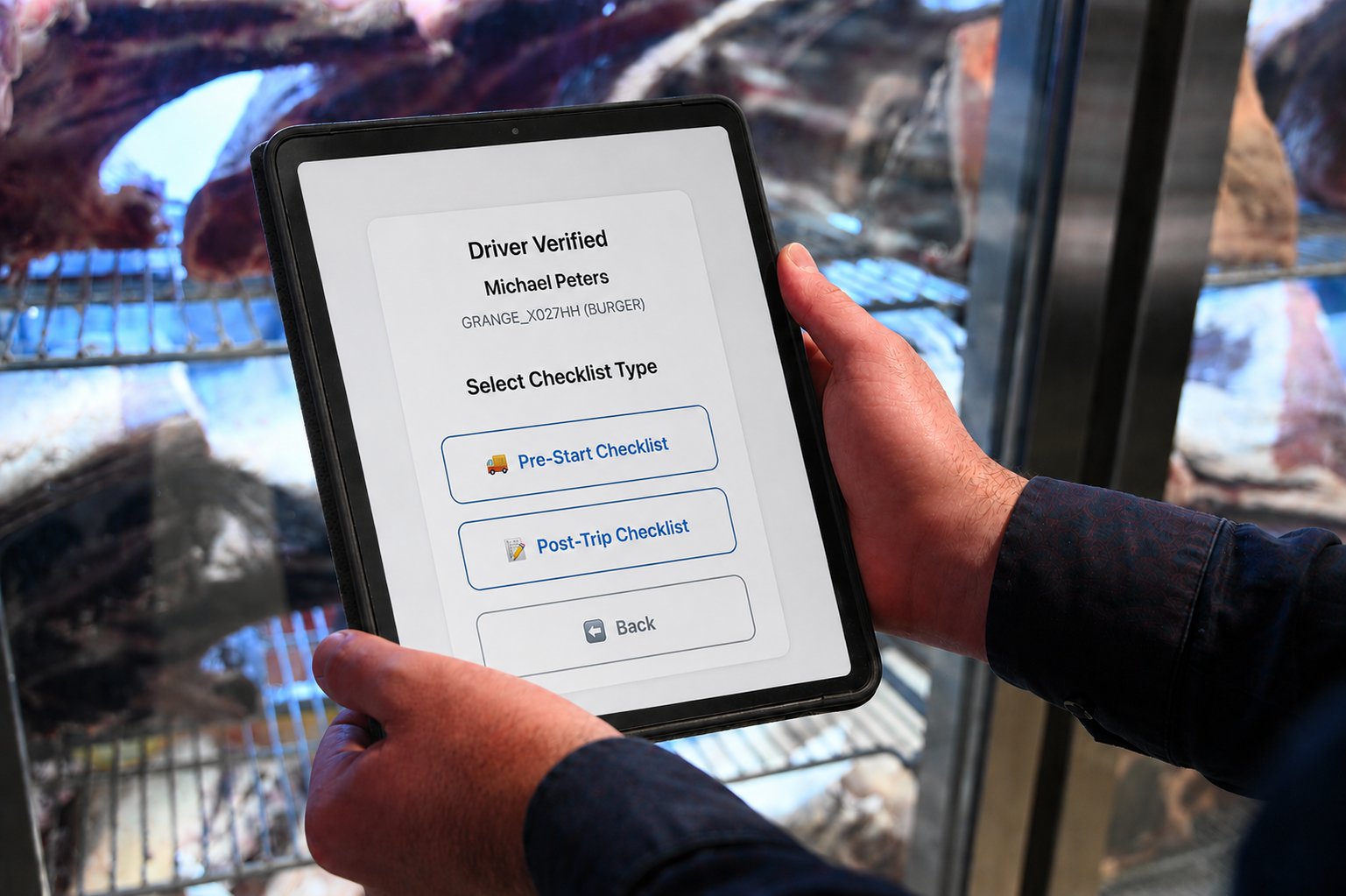
Driver scans the QR code and enters their 4-digit PIN. The system displays their name and licence for confirmation before proceeding - creating a verified, timestamped record.
Complete the Checklist
Drivers work through Yes/No and written questions tailored to their vehicle type. Safety-critical questions are flagged - a fail response alerts managers immediately.
Review Answers, Then Submit
Drivers review a full summary before submitting. Tap and hold any response for 3 seconds to edit it. Once confirmed, the checklist is timestamped and locked to their record.
Instant Email Report to Fleet Managers
Subscribed recipients get an automatic email on every submission. Safety-critical fails are highlighted. Configure Pre-Start, Post-Trip, or both - per recipient.



You Always Know Who Drove What
Every checklist is tied to a verified driver through a unique personal PIN, not just a vehicle. When a driver scans their vehicle's QR code and enters their PIN, the system confirms their identity before a single question can be answered.
That means every submission in your records is linked to a specific named driver, a specific vehicle, and an exact timestamp. No shared logins. No unsigned paper forms. No gaps in accountability.

Know About Vehicle Safety Issues Before the Next Shift Starts.
Not all checklist questions carry equal weight. Questions flagged as Safety Critical cover the checks that matter most for driver safety and vehicle roadworthiness. If a driver reports a fault against one of these, you are notified immediately.
Fleet managers receive an email the moment a safety critical response is submitted, with the specific question and answer highlighted. That gives you the information you need to pull a vehicle from service before anyone else gets behind the wheel.


Odometer, Fuel, Incidents. Captured Every Single Shift.
Post-trip checklists capture more than vehicle condition. Every submission records the odometer reading at the end of the shift, litres and cost of fuel purchased, any incidents or damage reported, and whether the vehicle was returned in a safe condition.
These records feed directly into your maintenance scheduling, cost tracking, and compliance reporting without any manual data entry from your office team. It just happens.

Your Fleet's Status in Your Inbox. Automatically.
Fleet managers and supervisors receive automated email summaries of completed checklists before and after each shift. You choose who gets notified, whether that is one person, a team, or a distribution list, and which checklists they receive.
No logging into a portal to find out if checklists were done. No chasing drivers. The information comes to you, every shift, every vehicle, without anyone having to remember to send it.

Got Questions?
Frequently Asked Questions
Everything you need to know about Vision Trak's digital pre and post trip checklist system. Can't find your answer? Get in touch with our team.
Vision Trak's digital checklist system replaces paper-based vehicle inspection sheets with a QR code-driven process. Each vehicle has a unique QR code that drivers scan at the start and end of every shift to complete a Pre-Start or Post-Trip checklist directly on their smartphone.
Results are automatically linked to the correct driver and vehicle, timestamped, and sent to subscribed fleet managers via email - giving you a complete, audit-ready compliance record without any manual data entry.
Pre-Start is completed before the driver departs. It covers vehicle roadworthiness - steering, brakes, tyres, lights, fluid levels, load security, and driver fitness. Its submission timestamps the official start of shift.
Post-Trip is completed at the end of the shift. It captures vehicle condition on return, any incidents or damage during the day, fuel added, odometer reading, and handover notes for the next driver. Its submission marks the end of shift.
The system currently supports four vehicle types, each with a tailored question set:
- Light Vehicle - cars, utes, and small work vehicles
- Van - cargo and passenger vans
- Truck - rigid and semi-trailer trucks
- Refrigerated Truck - includes additional cold chain and reefer unit questions
The vehicle type is assigned per asset in the VTtools portal. Drivers automatically receive the correct checklist when they scan their vehicle's QR code.
No app required. Drivers simply scan the vehicle QR code with their phone's built-in camera and the checklist opens instantly in their mobile browser. There is nothing to download, install, or update - on any device.
Yes. The digital checklist system is included as part of the Vision Trak platform at no additional cost. If you're already a customer and haven't set it up yet, contact our team and we'll get you configured straight away.
Most fleets are fully live within a single day. The setup process involves three steps - adding your drivers to VTtools, assigning vehicle types to your assets, and printing the QR codes for each vehicle. Once the QR codes are on the clipboards or in the cab, your drivers are ready to go.
Log in to VTtools and head to the Manage tab, then select Driver Management. Click + Add New Driver and fill in their details - name, date of birth, licence number, licence class, expiry date, and contact information.
Once created, the system automatically generates a unique 4-digit PIN for each driver. This PIN is what they use to verify their identity when completing a checklist.
Go to the Manage tab in VTtools and open the Asset page. Each vehicle has a QR button on the right side of its row. Click it to open the QR code, then download it as a PNG or PDF.
We recommend printing the QR code and attaching it to the driver's clipboard, or mounting it inside the vehicle cab so it's always accessible at the start and end of every shift.
The standard question sets are pre-built and optimised for each vehicle type to cover all key compliance and safety requirements. If your fleet has specific requirements or operational needs that go beyond the standard set, get in touch with our team to discuss what's possible.
In VTtools, go to Manage, scroll to the bottom and open Checklist Email Notifications. Enter the recipient's email address, toggle on Pre-Start, Post-Trip, or both, and click Add. You can add as many recipients as you need, and use shared distribution list addresses to notify entire teams at once.
Recipients can be edited or disabled at any time from the same page.
Drivers scan the QR code on their vehicle with their phone camera. This opens the checklist page in their browser, where they enter their unique 4-digit PIN. The system then displays their name and licence details - they confirm it's them before selecting which checklist to complete.
The whole login process takes under 30 seconds.
Fleet managers can regenerate a driver's PIN at any time from the Driver Management page in VTtools. Simply locate the driver in the list and click Regenerate next to their record. The new PIN is available instantly.
Yes. Before final submission, drivers are shown a full summary of every answer they've given. To edit a response, they simply tap and hold on that question tile for 3 seconds - it will unlock and allow them to update their answer before resubmitting.
Once the checklist is confirmed and submitted, answers are locked and cannot be altered.
Each QR code is uniquely linked to a specific asset. The checklist screen clearly displays the vehicle identifier before the driver proceeds, so they can confirm they've scanned the correct vehicle. If it's wrong, they simply go back and scan the right one - no submission is recorded until they hit Confirm and Submit at the end.
The checklist is browser-based, so an active internet connection is required to load and submit the checklist. We recommend drivers complete their checklists while still at the depot where connectivity is reliable, before heading out on the road.
All submitted checklists are stored against the driver and asset record in VTtools and can be accessed via the Reports tab. You can view the full response history per vehicle or per driver, filter by date range, and export records for compliance reporting.
Each notification email includes the driver's name, vehicle identifier, checklist type (Pre-Start or Post-Trip), submission timestamp, and a full breakdown of every answer. Any safety-critical questions that were answered with a fail response are highlighted prominently so managers can act immediately.
Checklist records are retained in VTtools for the duration of your subscription. If you need records for specific compliance, legal, or insurance purposes beyond that period, contact our team to discuss archival options.
Yes. Every checklist submission is timestamped, linked to a verified driver identity via PIN, and stored against the specific asset. This creates a detailed, tamper-resistant record that can support insurance claims, accident investigations, and chain-of-responsibility defences. We recommend speaking with your legal or insurance advisor about how best to use these records for your specific situation.
Safety Critical questions cover items where a failure poses an immediate risk to the driver, other road users, or the public - things like seatbelt functionality, brake responsiveness, steering, and tyre condition. They are clearly marked with a ⚠ Safety Critical tag in the checklist.
If a driver answers a Safety Critical question incorrectly (e.g. answers "No" to "Is the seatbelt present and functional?"), that response is immediately flagged and emailed to all subscribed fleet managers so the issue can be addressed before the vehicle departs.
Safety alert emails are sent immediately upon checklist submission. There is no delay - the moment a driver hits Confirm and Submit, the notification is triggered and delivered to all subscribed recipients.
Yes. Under Australia's Heavy Vehicle National Law (HVNL), chain-of-responsibility obligations extend to fleet operators, not just drivers. The Vision Trak checklist system creates a verifiable, timestamped record showing that your business has taken reasonable steps to ensure vehicles are roadworthy and drivers are fit for duty before each shift.
This documentation can be critical in demonstrating due diligence in the event of a compliance audit or incident investigation.
Absolutely. When a driver flags a fault - whether it's a warning light, unusual brake feel, or body damage - it's recorded against that vehicle immediately and flagged in the email notification. Fleet managers can act on it the same day rather than waiting for a vehicle to come back with a bigger problem. Combined with Vision Trak's Vehicle Maintenance Management module, you get a complete picture of fleet health in one place.
No. The digital checklist system is included as part of the Vision Trak platform at no extra charge. There are no per-driver fees, no per-submission costs, and no add-on pricing. It's built in.
No minimum. Vision Trak works for sole traders with a single vehicle through to large fleets with hundreds of assets. Our rental model means you only pay for the devices and plans you need - there are no large upfront costs or lengthy procurement processes.
Yes. Book a free demo with our team and we'll walk you through the full checklist system - and the rest of the Vision Trak platform - live. We can also set up a trial for your fleet so you can see exactly how it works in your environment before making any decisions.
Still have a question?
Our Australian-based team is ready to help. Get in touch and we'll get back to you fast.